

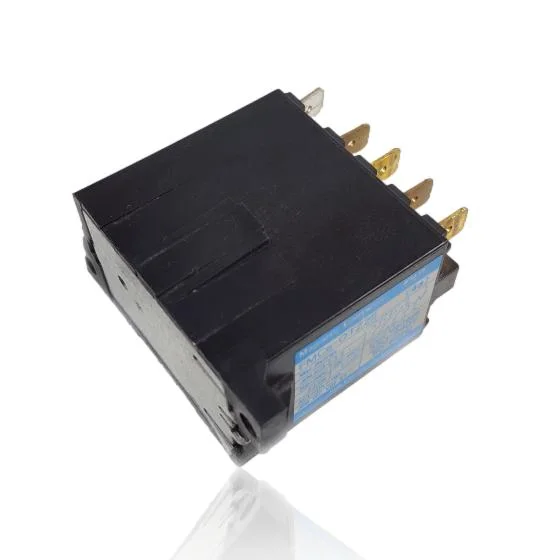
External Transformer Heat Pump Saunier Duval Ref. SDHV19
The External Transformer Heat Pump Saunier Duval is the component responsible for generating the spark needed to ignite the burner of the boiler. If it fails, you will notice that the boiler attempts to start unsuccessfully and eventually locks out. In case of an error, fault codes such as F.70, F.707, F.363, F.18, or F.20 may appear. This transformer is compatible with models from the Genia range, such as the Air 5/1, among others. A technician must confirm through diagnosis whether it needs to be replaced when the boiler does not ignite properly or shows the mentioned symptoms.
- Type of part
- Transformers
- Status
- Refurbished
- Catalogue reference
- SDHV19
- Warranty
- 1 year
Saunier Duval boilers compatible with reference SDHV19
Ignition transformer with reference SDHV19. A proven compatibility: Air 5/1.
Verified compatibility
| Boiler model | Family | Verification |
|---|---|---|
| Saunier Duval Air 5/1 | Genius | Verified |
Can't see your model or have questions? The printed reference takes precedence. How to check it · Send us a photo via WhatsApp.
How to check if the reference SDHV19 is the part for your boiler
The part reference, model, and equipment revision must be verified against the manufacturer's documentation.
- Find the reference printed on the installed part and check whether it matches the catalogue reference SDHV19. If it is not visible, do not identify the part from its shape alone.
- Check the full boiler model on its data plate and look for it in the model associations on this page.
- Compare the connections and physical body with the original part before installation.
- If anything is unclear, send us a photo of the marking via WhatsApp before placing your order.
Symptoms that require diagnosis in the ignition transformer SDHV19
The ignition transformer generates the high voltage for the spark of the electrodes. These are the typical symptoms and what to do:
Common symptoms and faults
- 01
The outdoor unit of the heat pump does not start even though the indoor unit seems to be giving the command to operate.
Cause: The control electronics of the outdoor unit is not receiving power.
Before changing it, measure the current at the faston terminals of the secondary with the outdoor unit connected to the power supply using a multimeter.
- 02
The outdoor unit intermittently stops communicating with the indoor unit, especially when the compressor is running.
Cause: A winding with a loose contact causes an unstable current under load, just when the electrical consumption increases.
With the equipment running, check if the fault coincides with the start of the compressor or the outdoor fan.
- 03
A fuse or a protection device repeatedly trips inside the outdoor unit.
Cause: A short circuit in any element supplying the secondary (control board, relay) requires more current than the winding provides.
Check the relays and the control board of the outdoor unit before blaming the transformer.
- 04
The fault appeared after a period of high humidity or after winter, with the unit being inactive for weeks.
Cause: Humidity and cold conditions promote the failure of an already weak winding or the oxidation of the faston terminals.
Before replacing it, check that the 8 faston terminals are not oxidized or loose; a cleaning and a proper reseating sometimes resolves the fault.
Fault codes Saunier Duval that require diagnosis
| Code | Fault | Technical checks |
|---|---|---|
| F.70 | Invalid boiler identification. | It usually appears after simultaneously replacing the display (UI) and the main PCB without reconfiguring the product code/DSN or with incorrect coding resistance. Verify by entering the service menu and readjusting the product code; if it persists, check/replace the display with the correct reference. |
| F.707 | It is not possible to establish any communication between the display and the PCB. | eBUS communication fault between the display board and the main PCB (cable/connectors or display module faulty). Check 5 V and eBUS signal at the connector, inspect/replace the cable, and test with another screen. |
| F.363 | EEPROM of the display: error during read/write test. | Memory of the display board damaged or with corrupted data. Verify by retrying the test from service; if it reappears, replace the display. |
| F.18 | User interface fault (display). | Fault in the display/interface board. Confirm power supplies and bus; test with a known-good display or replace the module. |
| F.20 | Software incompatibility (incorrect user interface or main PCB; incorrect product code). | Non-corresponding or incorrectly coded display/UI causes incompatibility with the PCB. Verify and correct the product code/DSN; if it does not match, install the correct display. |
| 12 | User interface fault (display/remote control). | In older models with numerical codes, error 12 points to the interface/display module. Check power supply and wiring and test with another display; if the issue persists, replace the display PCB. |
These symptoms can have more than one cause. If your boiler displays a fault code, send it to us via WhatsApp along with a photo of the labeling, and we'll tell you if this is the part.
Ignition transformer data sheet Saunier Duval SDHV19
- Catalogue reference
- SDHV19
- Uniclima internal SKU
- TEBCSDHV19
- Brand
- Saunier Duval
- Type of part
- Transformers
- Units in stock
- 3 units
- Status
- Refurbished
- Warranty
- 1 year
- Shipping
- Delivery time shown at checkout
- Return
- 14 days
Part data and available documentation
Contrast the label codes, PCB, and revision with the installed part; they are not necessarily equivalent references.
- Connection terminals
- 8 faston terminals
Frequently asked questions about the ignition transformer SDHV19
Does the transformer of the Genia Air 5/1 have 8 connection terminals?