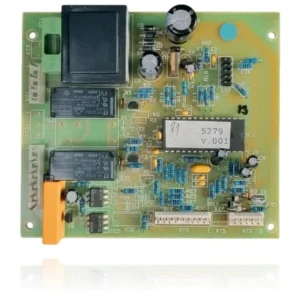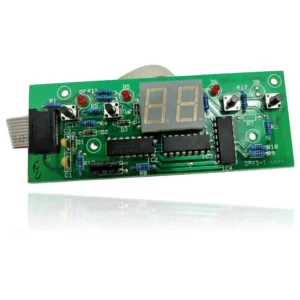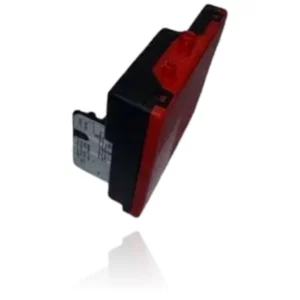


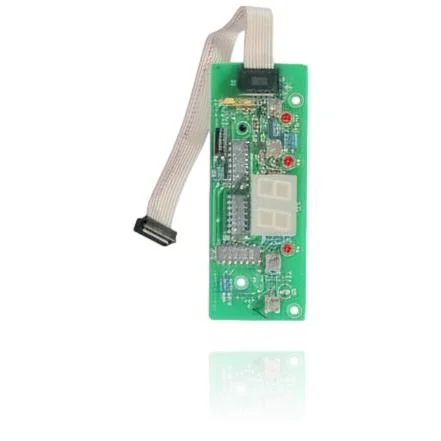
7-Segment Display PCB Protherm 24 BXV - Ref. 0020025308
If your boiler does not start, locks out, or exhibits erratic behavior, a technical diagnosis must confirm if you need the Protherm 24 BXV 7 Segment Display PCB - Ref. 0020025308. This control board is responsible for managing the ignition, burner modulation, pump, and safety features of the boiler. It is installed in models such as the Protherm 24 BXV, Leopard 24 BOV, and Leopard 24 BTV, as well as in the Renova STAR and Teknic C23E and F23E ranges, among others. A technician must confirm through diagnosis if it needs to be replaced when these fault symptoms are detected.
- Type of part
- PCBs (control boards)
- Status
- Refurbished
- internal SKU
- PLADYSRTF23X
- Warranty
- 1 year
Compatible Renova boilers
PCB. Six confirmed compatibilities: 24 BXV and LEOPARD 24 BOV.
Proven compatibility
| Boiler model | Family | Verification |
|---|---|---|
| Renova 24 BXV | PROTHERM | Contrasted |
| Renova LEOPARD 24 BOV | PROTHERM | Contrasted |
| Renova LEOPARD 24 BTV | PROTHERM | Contrasted |
| Renova STAR | RENOVA | Contrasted |
| Renova TEKNIC C23E | RENOVA | Contrasted |
| Renova TEKNIC F23E | RENOVA | Contrasted |
Can't see your model or have questions? The printed reference takes precedence. How to check it · Send us a photo via WhatsApp.
How to check if it is the part for your boiler
The part reference, model, and equipment revision must be verified against the manufacturer's documentation.
- Find the reference printed on the installed part and check whether it matches the catalogue reference —. If it is not visible, do not identify the part by its shape alone.
- Check the full boiler model on its data plate and look for it in the model associations on this page.
- Compare the connections and physical body with the original part before installation.
- If anything is unclear, send us a photo of the marking via WhatsApp before placing your order.
Symptoms that require diagnosis on the PCB
The PCB controls the ignition, modulation, and safety features of the boiler. These are the typical symptoms and what to do:
Common symptoms and faults
- 01
The display does not turn on or show any digits, although the boiler seems to be working normally.
Cause: The display board is not receiving power from the main board, or the flat cable is not making contact at one of its ends.
Make sure that the flat cable connector is properly seated at both ends and that no pin is bent before replacing the PCB.
- 02
The display shows incomplete segments, flickers, or appears and disappears intermittently.
Cause: A solder joint or a damaged trace on the display PCB can cause some segments to lose contact intermittently.
With the boiler turned on, carefully move the flat cable and observe if the flickering changes; if it varies when you touch it, check the wiring first before looking at the entire PCB.
- 03
The temperature and fault codes are not visible on the screen, although the boiler turns on and heats normally.
Cause: The main PCB continues to generate the information and the codes, but the display PCB does not receive them or is unable to show them.
If the boiler has a remote control or app that also displays faults, check if the fault appears there before assuming it is this PCB.
- 04
The boiler goes "blind": there's no way to know if there's an active error because the display is either off or frozen on a fixed value.
Cause: Without the display board operational, the only visual warning method is lost, even though the control unit continues to register the fault internally.
Cut the power to the boiler and turn it back on; observe the startup of the display for a few seconds; if it doesn't even perform the initial startup sweep, it points more towards the PCB.
These symptoms can have more than one cause. If your boiler displays a fault code, send it to us via WhatsApp along with a photo of the labeling, and we'll tell you if this is the part.
Renova PCB data sheet
- Uniclima internal SKU
- PLADYSRTF23X
- Brand
- Renova
- Type of part
- PCBs (control boards)
- Units in stock
- 7 units
- Status
- Refurbished
- Warranty
- 1 year
- Shipping
- Delivery time shown at checkout
- Return
- 14 days
Frequently asked questions about the PCB (control board)
Is this display PCB suitable for the Protherm Leopard 24 BOV?
Is this display PCB compatible with the Protherm 24 BTV or only with the 24 BOV?
Spare parts related to Renova PROTHERM