

Junkers PCB ZSC 35 3 MFA
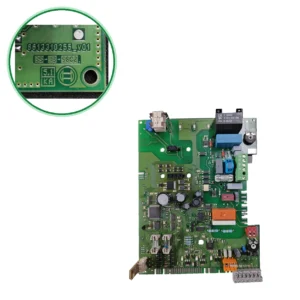
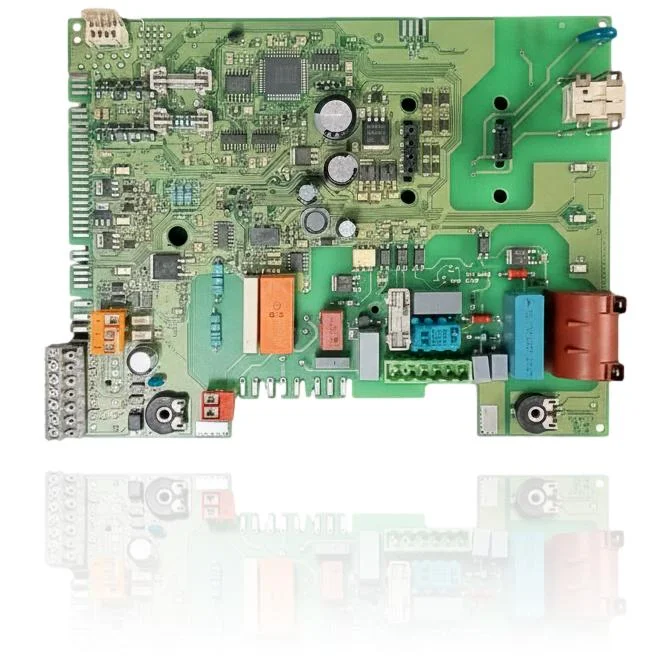
If your boiler does not start, locks out, or exhibits erratic behavior, a technical diagnosis must confirm if you need the Junkers ZSC 35 3 MFA PCB, reference S1047000. This control board manages functions such as ignition, burner modulation, and safety features of the boiler. It is installed in several models from the ZSC, ZWC, and ZWE ranges, such as the 24-3 MFA and the 35-3 MFA, among others. A technician must confirm through diagnosis if it needs to be replaced when you observe these symptoms, as its malfunction can affect the performance of your boiler.
- Type of part
- PCBs (control boards)
- Status
- Refurbished
- internal SKU
- PLBO174
- Warranty
- 1 year
Compatible Junkers boilers
PCB. Ten confirmed compatibilities: 24-3 MFA and 24-3 MFK.
Verified compatibility
| Boiler model | Family | Verification |
|---|---|---|
| Junkers 24-3 MFA | ZSC | Verified |
| Junkers 24-3 MFK | ZSC | Verified |
| Junkers 28-3 MFA | ZSC | Verified |
| Junkers 28-3 MFK | ZSC | Verified |
| Junkers 35-3 MFA | ZSC | Verified |
| Junkers 24-3 MFA | ZWC | Verified |
| Junkers 28-3 MFA | ZWC | Verified |
| Junkers 35-3 MFA | ZWC | Verified |
| Junkers 24-5 MFA | ZWE | Verified |
| Junkers 28-5 MFA | ZWE | Verified |
Can't see your model or have questions? The printed reference takes precedence. How to check it · Send us a photo via WhatsApp.
How to check if it is the part for your boiler
The part reference, model, and equipment revision must be verified against the manufacturer's documentation.
- Find the reference printed on the installed part and check whether it matches the catalogue reference —. If it is not visible, do not identify the part by its shape alone.
- Check the full boiler model on its data plate and look for it in the model associations on this page.
- Compare the connections and physical body with the original part before installation.
- If anything is unclear, send us a photo of the marking via WhatsApp before placing your order.
Symptoms that require diagnosis on the PCB
The PCB controls the ignition, modulation, and safety features of the boiler. These are the typical symptoms and what to do:
Common symptoms and faults
- 01
The two-digit display is blank, it doesn't even show a dash.
Cause: The PCB is not receiving power or is not processing the supply, so the display does not show a signal.
Check the fuse and the voltage at the connector before replacing it.
- 02
The display shows a fixed fault code and the boiler does not respond to anything.
Cause: The microprocessor is locked and cannot execute instructions.
Cut the power for one minute to force a reset before changing the PCB.
- 03
The boiler ignites the flame but turns off after a few seconds.
Cause: The PCB does not maintain the control signal over the gas valve or the fan.
Check that the problem does not come from the pressure switch or the ionization sensor before replacing the PCB.
- 04
The temperature controls do not respond when turned.
Cause: The long comb connector has lost contact with the potentiometers or buttons on the panel.
Check that the comb connector is properly inserted and that there are no bent pins before replacing the entire PCB.
These symptoms can have more than one cause. If your boiler displays a fault code, send it to us via WhatsApp along with a photo of the labeling, and we'll tell you if this is the part.
Technical sheet: Junkers PCB
- Uniclima internal SKU
- PLBO174
- Brand
- Junkers
- Type of part
- PCBs (control boards)
- Units in stock
- 2 units
- Status
- Refurbished
- Warranty
- 1 year
- Shipping
- Delivery time shown at checkout
- Return
- 14 days
Part data and available documentation
Contrast the label codes, PCB, and revision with the installed part; they are not necessarily equivalent references.
- voltage
- 12V
Frequently asked questions about the PCB (control board)
Is this Junkers ZSC 35 3 MFA PCB (reference PLBO174) compatible with my Junkers ZSC 24-3 MFA?
Can I use this PCB for a Junkers ZWC 28-3 MFA?
What type of connector does the Junkers ZSC 35 3 MFA PCB have?
How many boiler models are compatible with this PCB?
Are there documented fault codes for this PCB?
Spare parts related to Junkers ZSC