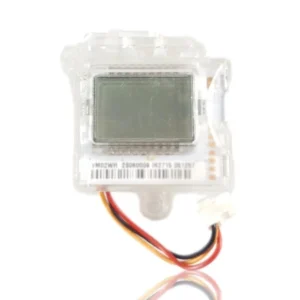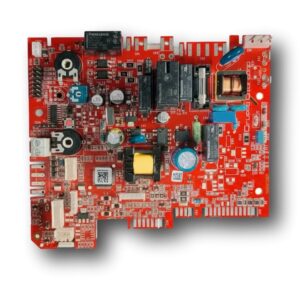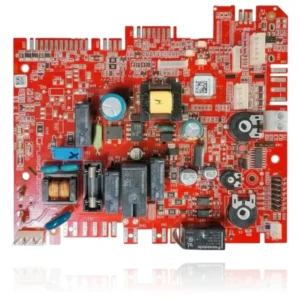


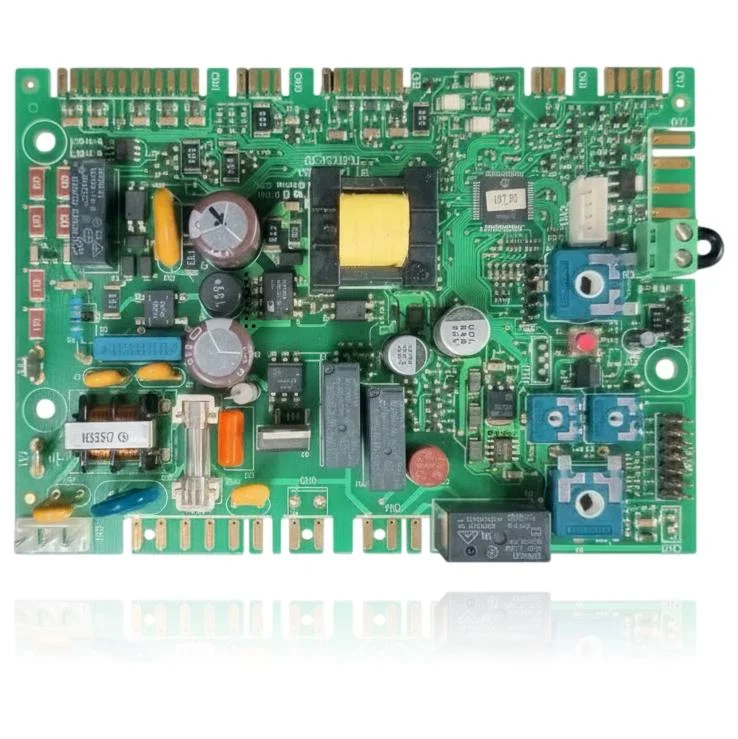
Beretta Junior Green 25 CSI Control PCB Ref. 20069541
Control PCB for Beretta boilers, with commercial reference 20069541 according to matching external sources. Compatible with the Ciao Green, Junior Green, Mynute Green, Paros Green, Quadra Green, and Simply Green ranges, and also referenced as valid for the Sylber range. The silkscreen only shows the marking 'H111.1.5', which corresponds to a mold code or board revision, not to the manufacturer or the component reference.
- Type of part
- PCBs (control boards)
- Status
- Refurbished
- Catalogue reference
- 20069541
- Warranty
- 1 year
Beretta boilers compatible with reference 20069541
PCB with reference 20069541. 16 verified compatibilities: Ciao Green 25 CSI and Ciao Green 25 RSI.
Proven compatibility
| Boiler model | Family | Verification |
|---|---|---|
| Beretta Ciao Green 25 CSI | Beretta Ciao Green | Contrasted |
| Beretta Ciao Green 25 RSI | Beretta Ciao Green | Contrasted |
| Beretta Ciao Green 29 CSI | Beretta Ciao Green | Contrasted |
| Beretta Junior Green 25 CSI | Beretta Junior Green | Contrasted |
| Beretta Junior Green 25 RSI | Beretta Junior Green | Contrasted |
| Beretta Mynute Boiler Green 25 BSI | Beretta Mynute Green | Contrasted |
| Beretta Mynute Green 25 CSI | Beretta Mynute Green | Contrasted |
| Beretta Mynute Green 30 CSI | Beretta Mynute Green | Contrasted |
| Beretta Paros Green 25 CSI | Beretta Paros Green | Contrasted |
| Beretta Paros Green 25 RSI | Beretta Paros Green | Contrasted |
| Beretta Paros Green 30 CSI | Beretta Paros Green | Contrasted |
| Beretta Simply Green 25 CSI | Beretta Simply Green | Contrasted |
| Beretta Quadra Green 25 CSI | Beretta Quadra Green | Contrasted |
| Beretta Lady Condensing 25 S/30 S | Sylber (condensation range) | Contrasted |
| Beretta Style Condensing 25 S/29 S | Sylber (condensation range) | Contrasted |
| Beretta Quadra Condensing K 25 S | Sylber (condensation range) | Contrasted |
Can't see your model or have questions? The printed reference takes precedence. How to check it · Send us a photo via WhatsApp.
How to check if the part number 20069541 is the one for your boiler.
The part reference, model, and equipment revision must be verified against the manufacturer's documentation.
- Find the reference printed on the installed part and check whether it matches the catalogue reference 20069541. If it is not visible, do not identify the part from its shape alone.
- Check the full boiler model on its data plate and look for it in the model associations on this page.
- Compare the connections and physical body with the original part before installation.
- If anything is unclear, send us a photo of the marking via WhatsApp before placing your order.
Symptoms that require diagnosis on the PCB 20069541
The PCB controls the ignition, modulation, and safety features of the boiler. These are the typical symptoms and what to do:
Common symptoms and faults
- 01
The boiler is working, but the display shows a fixed fault code that does not disappear even after resetting.
Cause: The PCB generates and maintains that code based on what its inputs detect; if the fault is in the electronics, the code does not clear with a simple reset.
Note the exact code and consult the manual before replacing the PCB: many codes point to a specific sensor or component, not to the PCB itself.
- 02
The circulation pump never stops, even when there is no demand for heating or domestic hot water.
Cause: The PCB controls the relay that activates the pump; if that relay gets stuck, the pump remains permanently on.
Disconnect the boiler for a moment and observe if the pump stops when the power is cut: if it gets stuck again when power is restored, it is more likely that the relay on the PCB is the issue.
- 03
The boiler turns off by itself halfway through a heating cycle without showing any clear fault.
Cause: An intermittent fault in the PCB can cut the supply to the gas valve without generating a stable fault code.
Check first that there are no voltage drops in the home's electrical installation, especially if the cut coincides with the start of other appliances.
- 04
The remote control or the room thermostat intermittently loses communication with the boiler.
Cause: The PCB includes the stage that communicates with the control; if that communication fails, the boiler stops receiving commands even though the rest is functioning.
Check the wiring of the communication bus (or the batteries if the remote is wireless) before blaming the PCB.
Beretta fault codes that require diagnosis
| Code | Fault | Technical checks |
|---|---|---|
| A 03 | Fan fault | The fan is not functioning properly, which may cause issues with gas evacuation. This could be due to a fault in the PCB. Check that the board is operational and that the fan is receiving power. |
These symptoms can have more than one cause. If your boiler displays a fault code, send it to us via WhatsApp along with a photo of the labeling, and we'll tell you if this is the part.
Data sheet for the Beretta 20069541 PCB.
- Catalogue reference
- 20069541
- Uniclima internal SKU
- PLBE008
- Brand
- Beretta
- Type of part
- PCBs (control boards)
- Units in stock
- 5 units
- Status
- Refurbished
- Warranty
- 1 year
- Shipping
- Delivery time shown at checkout
- Return
- 14 days
Part data and available documentation
Contrast the label codes, PCB, and revision with the installed part; they are not necessarily equivalent references.
- Commercial reference
- 20069541
- Silkscreen marking (mold code/PCB revision, not a spare part reference)
- H111.1.5
- Additional compatibility (external sources)
- Also referenced as compatible with the Sylber range, without specific models specified.
Manuals and technical documentation
Official documentation of the boiler, useful for locating the part and cross-referencing the fault codes.
- Beretta Junior Green 25 CSI Manual (PDF) Document © Beretta, provided as a technical reference.
Frequently asked questions about the PCB 20069541
Is this PCB Ref. 20069541 suitable for a Beretta Junior Green 25 CSI?
Does the PCB Ref. 20069541 also work for a Beretta Ciao Green 29 CSI?
What does the code 'H111.1.5' marked on the Junior Green 25 CSI control board mean?
Spare parts related to Beretta Beretta Ciao Green