

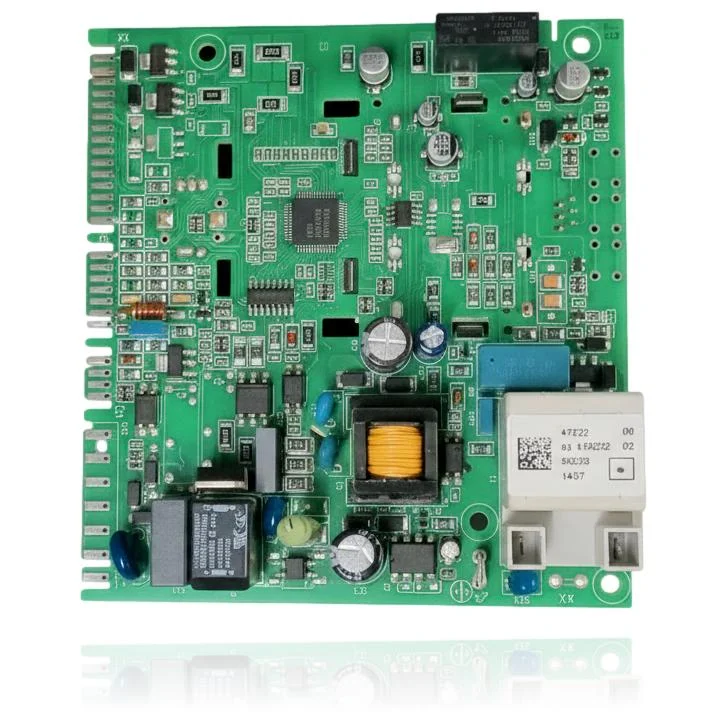
Immergas Caesar Eco 11 Display PCB
When you open the hot water tap, the PCB of the Immergas Caesar Eco 11, reference S1047000, is responsible for controlling the ignition and modulation of the burner. If this part fails, you will notice that the boiler does not start, gets locked, or exhibits erratic operation, potentially showing faults such as AL62, AL80, or AL98. It is compatible with boilers from the Caesar range, including models like Eco 11, Eco 14, and Eco Extra 11-14, among others. A technician must confirm through diagnosis whether it is necessary to replace the board when you experience these symptoms or faults to restore the boiler's operation.
- Type of part
- PCBs (control boards)
- Status
- Refurbished
- Catalogue reference
- 042650
- Warranty
- 1 year
Immergas boilers compatible with reference 042650
PCB with reference 042650. Three confirmed compatibilities: Eco 11 and Eco 14.
Proven compatibility
| Boiler model | Family | Verification |
|---|---|---|
| Immergas Eco 11 | Caesar | Contrasted |
| Immergas Eco 14 | Caesar | Contrasted |
| Immergas Eco Extra 11-14 | Caesar | Contrasted |
Can't see your model or have questions? The printed reference takes precedence. How to check it · Send us a photo via WhatsApp.
How to check if ref. 042650 is the part for your boiler
The part reference, model, and equipment revision must be verified against the manufacturer's documentation.
- Find the reference printed on the installed part and check whether it matches the catalogue reference 042650. If it is not visible, do not identify the part from its shape alone.
- Check the full boiler model on its data plate and look for it in the model associations on this page.
- Compare the connections and physical body with the original part before installation.
- If anything is unclear, send us a photo of the marking via WhatsApp before placing your order.
Symptoms that require diagnosis on the PCB 042650
The PCB controls the ignition, modulation, and safety features of the boiler. These are the typical symptoms and what to do:
Common symptoms and faults
- 01
The control panel screen does not turn on, it remains completely black.
Cause: If the display board fails, it does not light up even though the boiler continues to operate correctly.
Check if the boiler heats water or produces domestic hot water even if you don't see anything on the screen; if it works blindly, the problem is with this control board.
- 02
The display does not show any temperature, icons, or fault codes.
Cause: The LCD circuit of this PCB has stopped displaying an image, although it is still receiving power.
Check if any pilot light or LED on the control panel is still active; if there is power but no image, the fault is usually in the LCD of this PCB.
- 03
The screen flickers, it appears intermittently or turns off and on by itself.
Cause: A poor connection in the connector that links this PCB with the main one causes intermittent image cuts.
Before replacing it, disconnect and reconnect the connector that goes to the main PCB; often the fault is due to a contact issue, not the board itself.
Immergas fault codes that require diagnosis
| Code | Fault | Technical checks |
|---|---|---|
| AL62 | Request for full calibration (calibrate the gas valve). | After replacing or reprogramming the control/display board, the boiler detects the absence of board setting and requires gas valve calibration; verify this by entering the service menu and confirming AL62, then perform the calibration as indicated by the manual. |
| AL80 | Lockout due to gas valve driver issue (malfunction of the PCB controlling it). | The driver circuit that controls the valve is on the control/display board; if the PCB fails, it does not send a signal to the valve and the boiler locks with AL80; check by measuring the output to the valve and, if the valve is OK, confirm a defect in the board. |
| AL98 | Lockout due to reaching the maximum number of software errors. | The software/configuration resides on the PCB; accumulation of errors or corruption of parameters on the PCB causes AL98; check by attempting a reset and, if it reappears, verify/reprogram or a technician must confirm if it is necessary to replace the PCB. |
These symptoms can have more than one cause. If your boiler displays a fault code, send it to us via WhatsApp along with a photo of the labeling, and we'll tell you if this is the part.
Data sheet for the Immergas PCB 042650
- Catalogue reference
- 042650
- Uniclima internal SKU
- PECIEM05013X
- Brand
- Immergas
- Type of part
- PCBs (control boards)
- Units in stock
- 1 unit
- Status
- Refurbished
- Warranty
- 1 year
- Shipping
- Delivery time shown at checkout
- Return
- 14 days
Frequently asked questions about the PCB 042650
What fault does this display board of the Caesar Eco 11 solve?
My Caesar Eco 14 has a blank screen, is this the part I need?
Is this display board suitable for a Caesar Eco Extra 11-14?
Does this PCB also replace the main control board of the boiler?