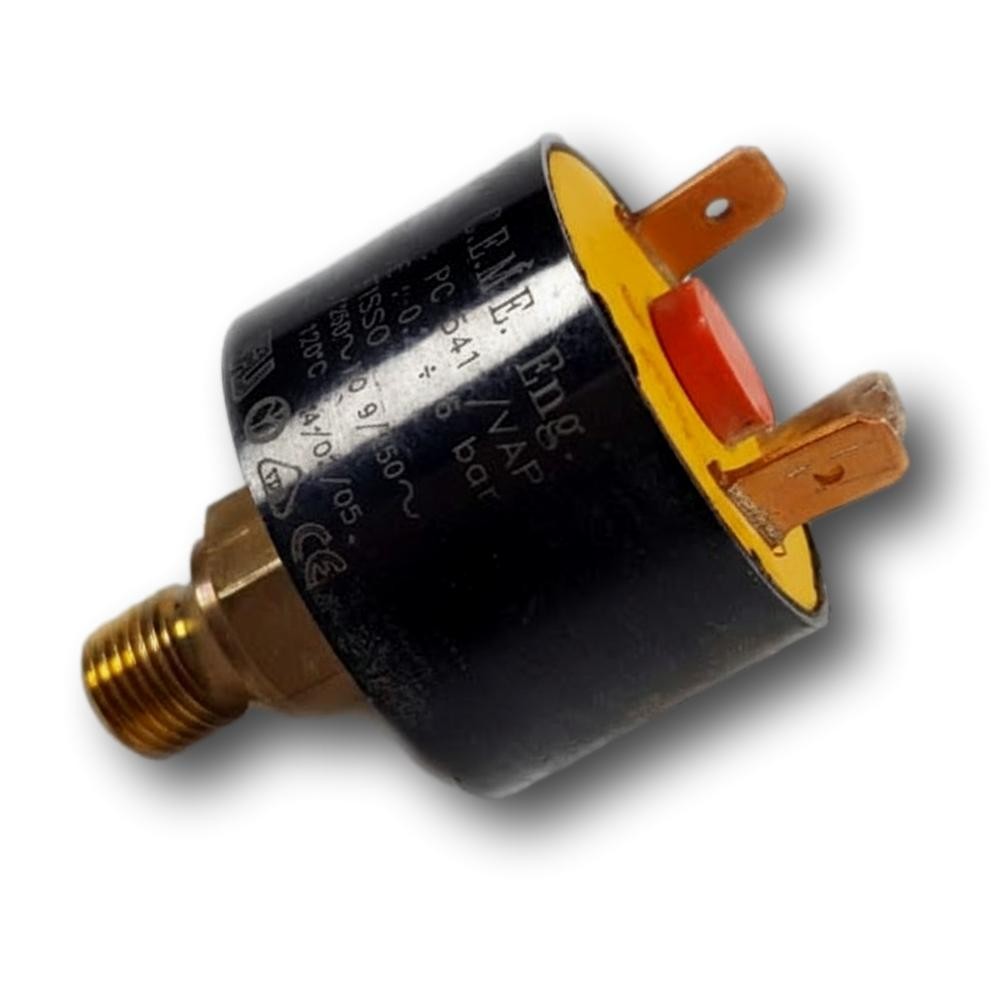
Pressure switch PC 041 for CE24E, CE30E, FA20, FA23E, FEB-20E, and FEB24AR

Pressure switch PC 041 for CE24E, CE30E, FA20, FA23E, FEB-20E, and FEB24AR

Stock · 1 unit

If your boiler does not start or gets blocked despite the pressure seeming correct, you may need the pressure switch PC 041 for CE24E, CE30E, FA20, FA23E, FEB-20E, and FEB24AR. This part is responsible for monitoring the air or water pressure to allow the boiler to operate. In case of a fault, the boiler may experience starting or blocking issues. It is compatible with models from the Fagor Contract, Ecomini, and Ecoplus ranges, among others. It is recommended to replace it when it shows symptoms of blocking or failed starting.

VAT included

Compatibility

Fagor boilers compatible with reference N63G000M2

Pressure switch with reference N63G000M2. Six confirmed compatibilities: CE24E and CE30E.

Proven compatibility

Boiler modelFamilyVerification
Fagor CE24EFagor Contract / Ecomini / Ecoplus (range CE/FA)Contrasted
Fagor CE30EFagor Contract / Ecomini / Ecoplus (range CE/FA)Contrasted
Fagor FA20Fagor Contract / Ecomini / Ecoplus (range CE/FA)Contrasted
Fagor FA23EFagor Contract / Ecomini / Ecoplus (range CE/FA)Contrasted
Fagor FEB20EUFagor Contract / Ecomini / Ecoplus (range CE/FA)Contrasted
Fagor 1FEB24ARIBFagor Contract / Ecomini / Ecoplus (range CE/FA)Contrasted

Can't see your model or have questions? The printed reference takes precedence. How to check it ·

Guide

How to check if ref. N63G000M2 is the part for your boiler

What determines it is not the boiler model, but the reference printed on the part you already have installed.

  1. Find the reference printed on the installed part and check whether it matches the catalogue reference N63G000M2. If it is not visible, do not identify the part from its shape alone.
  2. Check the full boiler model on its data plate and look for it in the model associations on this page.
  3. Compare the connections and physical body with the original part before installation.
  4. If anything is unclear, send us a photo of the marking via WhatsApp before placing your order.
Diagnosis and fault codes

Symptoms and faults that the pressure switch N63G000M2 resolves.

The pressure switch controls the air or water pressure to authorize operation. These are the typical symptoms and what to do:

Common symptoms and faults

  • 01

    The boiler locks out with a pressure fault warning and trips again immediately after resetting it.

    Cause: The pressure switch is set to 6 bar, so if it activates prematurely, the PCB interprets that there is overpressure and locks the unit for safety.

    Measure with the boiler's manometer if that pressure is actually reached before the cutoff; if it cuts off well below, the problem is with the pressure switch.

  • 02

    The boiler does not ignite the burner even though the rest of the system starts up normally.

    Cause: If the contact does not close, the control unit does not receive the confirmation of correct pressure and does not send the ignition command to the burner.

    Check that the tube or fitting carrying pressure to the pressure switch is not blocked before replacing it.

  • 03

    A warning related to pressure appears and only disappears when the boiler is turned off and on again.

    Cause: A contact with an incipient fault switches unstably and momentarily recovers when the electronics are reset.

    Note how many times a day the warning repeats: if it increases, it is more of a pressure switch than an installation.

  • 04

    The pressure in the circuit rises or falls normally, but the boiler reacts as if something is wrong.

    Cause: The contact of this pressure switch is reliable from the factory; moisture or dirt on the terminal alters the signal before the adjustment itself.

    Clean and inspect the electrical connector of the pressure switch: often the fault is there and not in the part itself.

These symptoms can have more than one cause. If your boiler displays a fault code, send it to us via WhatsApp along with a photo of the labeling, and we'll tell you if this is the part.

Technical data

Datasheet for the Fagor pressure switch N63G000M2

Catalogue reference
N63G000M2
Brand
Fagor
Type of part
Pressure switches
Units in stock
1 unit
Status
Refurbished
Warranty
1 year
Shipping
1-2 business days
Return
14 days

Data read on the part and in the manufacturer's documentation

What we have not been able to verify does not appear here.

Manufacturer code
PC 041
Pressure setting / range
6 bar
Standard
ISO 9001
Maximum temperature (reading 1)
-120°C
Temperature (reading 2)
120°C
Frequently Asked Questions

Frequently asked questions about the pressure switch N63G000M2

What pressure is the pressure switch PC 041 set to?
At 6 bar, according to the label, and it carries ISO 9001 certification and CE marking.
Is this PC 041 pressure switch suitable for the FEB-20E?
Yes, the FEB-20E is on the list of compatible boilers, along with CE24E, CE30E, FA20, FA23E, and FEB24AR.
What fault in the FA23E indicates that the pressure switch PC 041 needs to be replaced?
It is changed when the boiler locks out due to a pressure error.

Spare parts related to Fagor Fagor Contract / Ecomini / Ecoplus (CE/FA range)

Delivery 1–2 daysworking days, mainland Spain
1-year warrantyreviewed and tested
14-day returnuninstalled parts
Technical supportwe verify your model
Pressure switch PC 041 for CE24E, CE30E, FA20, FA23E, FEB-20E, and FEB24AR