

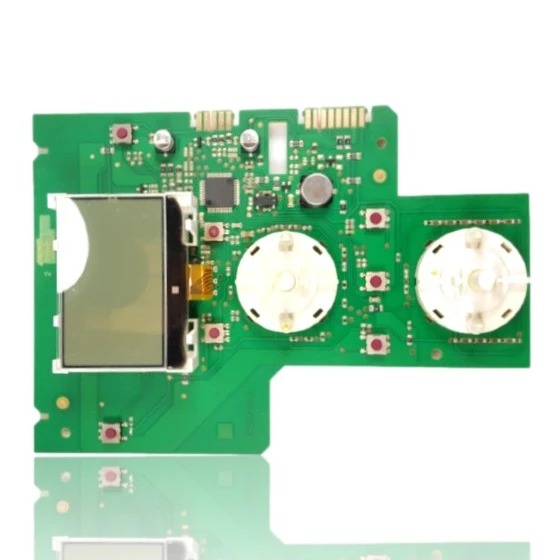
Chaffoteaux Clas Evo / Genus Evo / Pigma Evo Control Board - Ref. 60001897
When you open the hot water tap or turn on the heating, the Chaffoteaux Clas Evo / Genus Evo / Pigma Evo PCB (control board) - Ref. 60001897 is responsible for controlling the ignition and modulation of the burner, as well as managing the pump and the safety features of the boiler. If this part fails, you will notice that the boiler does not start, gets locked, or behaves erratically, potentially generating faults such as 303, 305, 306, or 307. It is compatible with models from the Pigma Evo, Pigma Evo System, Pigma EU, Serelia Evo, and Urbia Evo ranges, among others. A technician must confirm through diagnosis whether it needs to be replaced when there are starting or operational faults in the boiler.
- Type of part
- PCBs (control boards)
- Status
- Refurbished
- Catalogue reference
- 60001897 04
- Warranty
- 1 year
Chaffoteaux boilers compatible with reference 60001897 04
PCB with reference 60001897 04. 17 verified compatibilities: Pigma Evo 25 CF and Pigma Evo 25 FF.
Proven compatibility
| Boiler model | Family | Verification |
|---|---|---|
| Chaffoteaux Pigma Evo 25 CF | Pigma Evo | Contrasted |
| Chaffoteaux Pigma Evo 25 FF | Pigma Evo | Contrasted |
| Chaffoteaux Pigma Evo 30 CF | Pigma Evo | Contrasted |
| Chaffoteaux Pigma Evo 30 FF | Pigma Evo | Contrasted |
| Chaffoteaux Pigma Evo 35 FF | Pigma Evo | Contrasted |
| Chaffoteaux Pigma Evo System 25 CF | Pigma Evo System | Contrasted |
| Chaffoteaux Pigma Evo System 25 FF | Pigma Evo System | Contrasted |
| Chaffoteaux Pigma Evo System 30 FF | Pigma Evo System | Contrasted |
| Chaffoteaux Pigma Evo System 35 FF | Pigma Evo System | Contrasted |
| Chaffoteaux Pigma EU 25 CF | Pigma EU | Contrasted |
| Chaffoteaux Pigma EU 30 CF | Pigma EU | Contrasted |
| Chaffoteaux Serelia Evo 30 FF | Serelia Evo | Contrasted |
| Chaffoteaux Urbia Evo 25 CF | Urbia Evo | Contrasted |
| Chaffoteaux Urbia Evo 25 FF | Urbia Evo | Contrasted |
| Chaffoteaux Urbia Evo 30 CF | Urbia Evo | Contrasted |
| Chaffoteaux Urbia Evo 30 FF | Urbia Evo | Contrasted |
| Chaffoteaux Urbia Evo 35 FF | Urbia Evo | Contrasted |
Can't see your model or have questions? The printed reference takes precedence. How to check it · Send us a photo via WhatsApp.
How to check if ref. 60001897 04 is the part for your boiler
The part reference, model, and equipment revision must be verified against the manufacturer's documentation.
- Find the reference printed on the installed part and check whether it matches the catalogue reference 60001897 04. If it is not visible, do not identify the part from its shape alone.
- Check the full boiler model on its data plate and look for it in the model associations on this page.
- Compare the connections and physical body with the original part before installation.
- If anything is unclear, send us a photo of the marking via WhatsApp before placing your order.
Symptoms that require diagnosis on the PCB 60001897 04
The PCB controls the ignition, modulation, and safety features of the boiler. These are the typical symptoms and what to do:
Common symptoms and faults
- 01
The LCD screen does not turn on and the controls do not respond either.
Cause: The display and controls are on the same front PCB, so an internal fault affects both.
Check if the boiler is receiving power and if other indicators on the boiler (if any) are still active before replacing the part.
- 02
The display looks good, but the controls do not change either the temperature or the mode of the boiler.
Cause: The button section of the PCB may fail, even if the display works correctly.
Test each control separately several times; if none respond, the fault is more likely to be with the PCB.
- 03
The panel turns off by itself from time to time and then turns back on.
Cause: This could be due to a poor internal connection of the PCB or the connector that links it to the rest of the boiler.
Visually check the connectors on the back of the panel, without forcing the cables, to rule out a loose connection before replacing it.
- 04
The parameters of the boiler cannot be viewed or adjusted from the panel.
Cause: Without this control board, the only access to the boiler's settings is lost, even though the rest is functioning.
Check if the boiler is still heating normally despite the fault with the panel; this confirms that the problem is with this part.
Chaffoteaux fault codes that require diagnosis
| Code | Fault | Technical checks |
|---|---|---|
| 303 | Main PCB fault. | Self-diagnosis detects a fault in the main PCB (microcontroller, power supply, or control circuits). Check voltages 230V→5/12V on the board, display–board connections, and, if applicable, test with a known PCB. |
| 305 | Main PCB fault. | Fault in the PCB electronics (power supply/CPU/drivers) detected by the system. Check 5/12V rails, relays, and connector continuity; if it persists, replace the PCB. |
| 306 | Main PCB fault. | Internal fault of the main PCB preventing correct management. Check power supply and internal communications; confirm with temporary replacement of the PCB. |
| 307 | Main PCB fault. | Hardware fault in the main PCB recognized by the self-diagnosis. Measure voltages, check solder joints/critical components, and confirm with a test board. |
These symptoms can have more than one cause. If your boiler displays a fault code, send it to us via WhatsApp along with a photo of the labeling, and we'll tell you if this is the part.
Data sheet for the Chaffoteaux 60001897 04 PCB.
- Catalogue reference
- 60001897 04
- Uniclima internal SKU
- DECPE30
- Brand
- Chaffoteaux
- Type of part
- PCBs (control boards)
- Units in stock
- 1 unit
- Status
- Refurbished
- Warranty
- 1 year
- Shipping
- Delivery time shown at checkout
- Return
- 14 days
Part data and available documentation
Contrast the label codes, PCB, and revision with the installed part; they are not necessarily equivalent references.
- Type of component
- PCB with LCD display and controls on the front side (the side with the identification label has not been seen)
Manuals and technical documentation
Official documentation of the boiler, useful for locating the part and cross-referencing the fault codes.
- Chaffoteaux Pigma Evo System 25 FF Manual (PDF) Document © Chaffoteaux, provided as a technical reference.
Frequently asked questions about the PCB 60001897 04
Does this PCB work for a Chaffoteaux Genus Evo 30 FF boiler?
What fault does replacing the PCB Ref. 60001897 of the Chaffoteaux Pigma Evo resolve?
Does the PCB of the Chaffoteaux Urbia Evo come with an integrated display?